Have an automotive scanner in your palm
Announcements
Do you want to diagnose mechanical problems of your car without having to go to a workshop? An automotive scanner in the form of an application offers this possibility. With the right technology, you can identify faults in the engine, transmission and electronic systems in seconds, all through the screen of your smartphone.
Announcements
Digital transformation has reached garages and workshops, but also your pocket. Modern mechanical scanner apps do not require advanced technical knowledge and work with low-cost devices.If you are considering using this technology, this practical guide will show you every step to implement a real automotive scanner in your day to day.
What is a Mechanical App Scanner
A mechanical scanner app is an application that connects to a physical adapter attached to the OBD-II port of your vehicle. This connection allows you to read diagnostic data in real time, capturing information that the car’s on-board computer constantly records. You can see from the battery status to engine-specific error codes, without opening the hood.
Unlike a manual scanner in a workshop, the app makes reading data accessible and easy. The smartphone receives the information via Bluetooth or WiFi, showing in clear language what is happening with your vehicle. Many apps also offer reading history, allowing you to track problems over time.
Step 1: Choose the Correct Adapter Device
The first step is to purchase an OBD-II adapter compatible with your phone. There are Bluetooth, WiFi and USB-C versions, each with specific advantages.The Bluetooth version is the most popular because it works with any recent smartphone and maintains wireless distance between your phone and the adapter.
When choosing the device, make sure it is compatible with your car model. Cars produced after 1996 have the standardized OBD-II port, but the quality and accuracy of the data vary by adapter manufacturer.
The cost of a good adapter varies between 50 to 200 reais depending on the brand and features. Do not save too much at this stage, as a bad adapter will provide inaccurate readings and affect the entire experience.
Step 2: Install the Automotive Scanner App
After purchasing the adapter, download the compatible application from the Play Store or App Store. Apps like OteApp offer intuitive interface and explanations of the error codes in English. Make sure that the app you choose works specifically with your OBD-II adapter to avoid incompatibilities.
Install the app on your smartphone and make sure it requires special permissions like location or file access. Many apps ask for these permissions to record travel history and diagnostics. Grant the necessary permissions during initial setup and leave the app updated for better features.
Step 3: Connect the Adapter to the Car
Locate the OBD-II port under the steering wheel, usually on the left side of the instrument panel. The port is a small, easily identifiable rectangular connector. Insert the adapter firmly until you hear a click, signaling that it is completely docked.
Turn on the ignition of the car without starting the engine, leaving the electronic system awake. The Bluetooth adapter will begin to flash or illuminate, indicating that it is ready to pair with your phone. This is the perfect time to connect via Bluetooth on your smartphone.
Step 4: Pair the Adapter with your Smartphone
Go to your phone’s Bluetooth settings and look for the adapter name in the list of available devices. It usually appears with names like “OBD2” or the manufacturer’s specific name. Tap it to start pairing, which takes a few seconds.
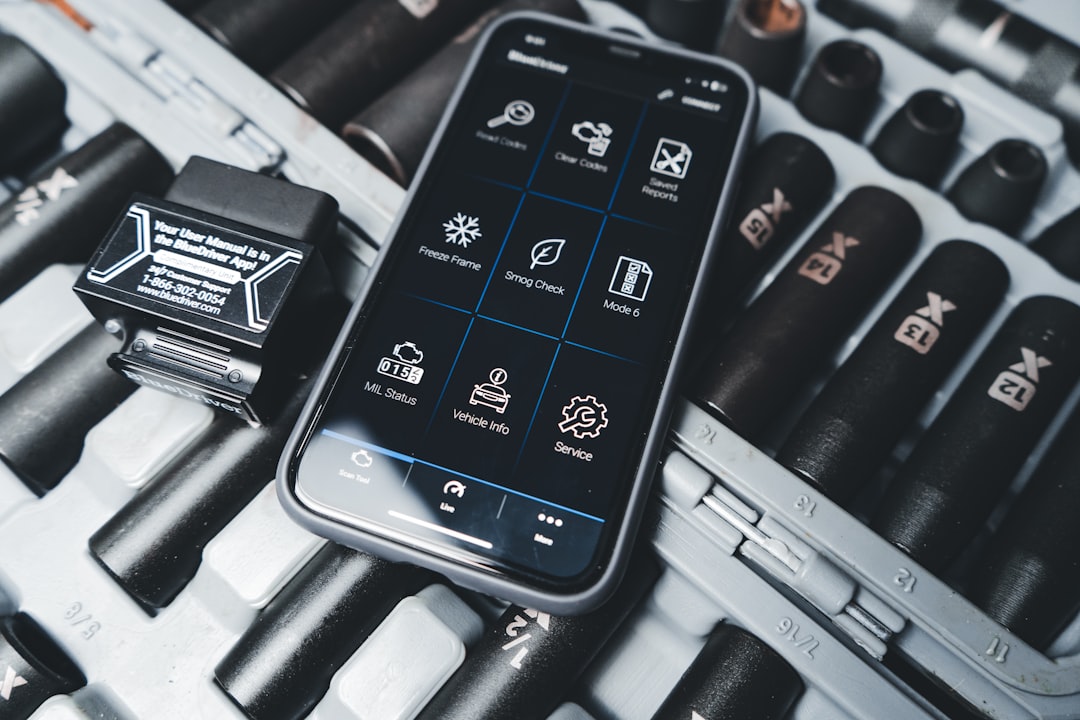
Some adapters require a default password such as “1234” or “0000” during the first pairing. Please refer to your device manual if you have any questions. After successfully connecting, your smartphone will automatically recognize the adapter the next time you launch the app.
Step 5: Open the App and Start Reading Diagnostics
With the paired adapter, open the mechanical scanner app on your phone. On the home screen of the app, look for a button like “Connect” or “Diagnose”. The app will automatically detect the connection to the adapter and start reading the vehicle data.
You will see real-time information such as engine temperature, revolutions per minute (RPM), fuel consumption and emissions data. The application categorizes this information into clear and visual sections.If there are errors or fault codes, they will appear with detailed descriptions of the problem.
Step 6: Interpret the Error Codes
Error codes appear in the format “P” followed by numbers, such as “P0301” which indicates ignition failure. The best mechanical scanner app provides simple explanation of what each code means. You will know if it is something serious that requires immediate repair or if you can wait for a scheduled overhaul.
Record the error code in a notepad or use the history of the app itself. Some problems resolve on their own after a few driving cycles, while others persist. Tracking this information helps you accurately inform the mechanic about what is happening to your car.
Step 7: Monitor Trends Over Time
Most good automotive scanner apps keep a history of previous reads. Use this feature to track the evolution of issues and check if repairs worked.If you repaired a failure weeks ago and the code reappears, this indicates a deeper issue that deserves attention.
Take diagnostic readings regularly, especially before long trips or when you notice strange behavior in the vehicle. With historical data in hand, you negotiate better with mechanics and avoid unnecessary repairs. Knowledge of your car data puts you in a position of control over maintenance and expenses.
Advantages of Using a Digital Automotive Scanner
The economy with workshops is the most obvious advantage, but it is not the only one. You gain autonomy to understand your car, recognize fault patterns and plan preventive maintenance. An informed driver avoids trips in a vehicle with serious problems and reduces the risk of accidents caused by mechanical failures.
Convenience is also highlighted: you diagnose the car in minutes when you want, without scheduling or displacement. Detailed information reaches your pocket, helping in decisions about selling the vehicle or negotiating price with buyers. The mechanical scanner app turns you from passenger to active manager of the health of your car.
Final Tips for Maximum Performance
Keep the adapter clean and protected from moisture when not in use. Put it in a small plastic bag to prevent dust or water damage. Also regularly check for updates available for your app, as manufacturers release improvements and add support for more car models frequently.
Use the app as a support tool, never as a replacement for a professional mechanic for complex repairs. An error code can have multiple causes and require physical diagnosis from the workshop.But with the right information coming from the automotive scanner, you get there with enough knowledge to question and understand any technical explanation you receive.