
Automotive Scanner App: Practical Step by Step Guide
Announcements
An automotive scanner app has transformed the way car owners diagnose vehicle problems.You no longer have to spend hundreds in a workshop to find out what is wrong with your car.
Announcements
In this practical guide, you will learn everything about using an automotive scanner app, from installation to interpretation of error codes.We will explore the features, advantages and how to choose the best app for your needs.
What is an Automotive Scanner App
An automotive scanner app is software installed on your smartphone that connects to the vehicle’s on-board computer via a Bluetooth or USB device. This app allows you to read fault codes, monitor real-time engine performance and access diagnostic information that was previously unique to specialized workshops. The technology uses the OBD-II protocol, an international standard present in virtually all cars manufactured since 1996.
The main functionality of an automotive scanner is to decode the error codes that your vehicle stores when something does not work properly. When you turn on the check engine warning on the dashboard, the car registers a specific code that identifies exactly which system has problems. You can access this data directly from your mobile phone, saving time and money on diagnostics.
How Connection to Your Vehicle Works
To use an automotive scanner app, you first need an OBD-II adapter compatible with your smartphone. These adapters are small devices that connect to the vehicle diagnostic port, usually located under the steering wheel, near the pedals.The adapter acts as an intermediary between the car computer and your mobile phone, transmitting the data in real time via Bluetooth or mobile data connection.
The connection process is simple: you insert the adapter into the OBD-II port, open the application on your mobile phone and establish pairing via Bluetooth. Most automotive scanner apps automatically detect the vehicle model and already start reading the stored codes.You do not need advanced technical knowledge, because the applications present the information in clear and accessible language.
Some modern adapters have built-in SIM card, allowing you to monitor the vehicle remotely even when it is far from the car. This functionality is particularly useful for fleet owners, taxi drivers and app drivers who need to track the performance of multiple vehicles simultaneously.
Step by Step to Use an Automotive Scanner App
The first step is to choose a reliable application in the application store of your mobile. Search for apps that have positive reviews, support your language and compatibility with your phone. After installing the app, you will need to purchase a compatible OBD-II adapter, which costs between R $ 50 and R $ 300 depending on the features offered.
Once you have the app installed and the adapter in hand, locate the OBD-II diagnostic port of your vehicle. On older cars, it is close to the handbrake or under the dashboard. In modern vehicles, you usually find the port on the bottom left or right of the steering wheel. Before connecting, make sure that the engine is off to avoid voltage spikes that could damage the adapter.
Insert the OBD-II adapter into the port and wait a few seconds until the LED on the device indicates that it is ready. Open the automotive scanner app on your mobile phone and go to the Bluetooth pairing settings. Look for the name of your adapter in the list of available devices and select it. The system will ask for a pairing code, usually default as 0000 or 1234.
When the connection is established, the app will ask you to confirm some vehicle data such as year, make and model. This information helps the app to interpret the codes more accurately according to the specifications of your car. After that, you are ready to start reading the vehicle data and diagnose problems.
Key Features You Should Know
Fault code reading is the most important feature of an automotive scanner app. When you detect an error code, the app displays not only the numerical code, but also a clear description of the problem. For example, the P0300 code means “Random Misfire Detected”, which indicates random engine failures.You can immediately understand the severity of the problem and whether it is safe to continue driving.
Real-time monitoring allows you to track various vehicle parameters while driving.You can observe engine temperature, fuel consumption, revolutions per minute, oil pressure and many other data simultaneously. This functionality is extremely useful for identifying abnormal behaviors while driving and confirming if a problem only occurs in specific situations.
The code erasure feature allows you to clean up the stored errors after solving the problem in the vehicle. Some apps allow you to do this directly through the application, while others require you to visit a workshop. It is important to remember that deleting a code does not solve the problem, it just removes the error memory so that you can monitor whether it occurs again.
Many automotive scanner apps include diagnostic histories, allowing you to track the evolution of problems over time. You can export PDF reports or send to a mechanic so that he has a more complete diagnosis before starting the repair. This documentation is particularly valuable when you plan to sell your vehicle as it proves that the car has been well maintained.
Advantages of Using an Automotive Scanner App
Money saving is the most immediate advantage of using an automotive scanner app. You save on unnecessary diagnostics in workshops, because you can identify the problem exactly before paying for the mechanic’s labor. A diagnosis in a specialized workshop costs between R $ 100 and R $ 300, while a good OBD-II adapter pays for itself in just one or two code reads.
Full control over your vehicle diagnosis is another important benefit.You are no longer dependent on a mechanic to know what is happening to your car. With the automotive scanner app, you have access to the same information that professionals use, allowing you to make more informed decisions about maintenance and repairs.
The convenience of having a scanner in your pocket is invaluable these days.You can check the status of your vehicle anytime, anywhere, without having to go to a workshop. If the check engine warning lights up while you are traveling, you can instantly know if it is safe to continue or if you need to stop immediately.
Preventive maintenance is made much easier with an automotive scanner app.You can track vehicle performance regularly and identify developing problems before they become serious. This proactive approach extends the life of the car and prevents costly repairs that would result from neglect.
Limitations and Important Considerations
Not every problem in the vehicle generates a fault code that the automotive scanner app can read. Pure mechanical problems, such as brake pad wear or simple electrical failures, may not appear as errors on the on-board computer. You need to understand that the app is an electronic diagnostic tool, not a solution to all vehicle problems.
Interpreting the codes requires some technical knowledge to be useful. An error code can have multiple possible causes, and the app may not be able to determine exactly which one is affecting your vehicle. So it is important to take the collected information to an experienced mechanic who can do additional tests to confirm the diagnosis.
Some modern vehicles, especially luxury or imported ones, have security systems that prevent the connection to third-party applications. If your car has this type of protection, the automotive scanner app will not be able to connect properly. You should check the compatibility of your vehicle before investing in an OBD-II adapter.
Your phone’s battery can be consumed quickly when you leave the app running continuously while driving. If you plan to use real-time monitoring during long journeys, consider investing in a vehicle charger that’s compatible with your phone.
Choosing the Best Automotive Scanner App for You
There are several options for automotive scanner apps on the market, from basic and free versions to paid professionals. Free apps usually have limited functionality and may include ads, but are great for those who just want to read fault codes occasionally. Paid versions offer more functionality, better interface and user support, being ideal for those who use it frequently.
The compatibility of the app with your OBD-II adapter is crucial. Not all apps work with all adapters, so you should check in the product description if the app you chose is compatible with the hardware you plan to buy. Most adapters include recommendations for compatible apps on the packaging or manual.
Look for apps that feature an intuitive and easy-to-use interface.You don’t want to spend time trying to figure out how to navigate between menus when you should be diagnosing a problem in your vehicle. Read reviews from other users to get an idea of the ease of use and quality of technical support offered.
Also consider whether the app offers up-to-date crash code databases. A good app should be updated regularly to include new vehicle models and new diagnostic information. Some apps have active user communities that share additional information and troubleshooting tips that are very valuable.
Security and privacy are also important when you choose an automotive scanner app. Make sure the developer has a clear privacy policy and that the app does not collect unnecessary data from your phone. More reliable apps have security certifications and have been reviewed by regulatory bodies.
Frequently Asked Questions about Automotive Scanner Apps
The most common question is: “What is the best automotive scanner app?”. The answer depends on your specific needs, budget and vehicle model.For most home users, apps like OteApp, OBD Auto Doctor or Torque Pro offer excellent value for money with comprehensive features and good compatibility with different brands of adapters.If you need very advanced diagnostics, professional apps like OteApp have more robust features.
Another frequent question is: “What OBD-II adapter should I buy?”. The best adapters combine broad compatibility, durable build quality and affordable price.Search for products with Bluetooth 4.0 or higher and make sure they work with your specific car model.Recent brands like original ELM327, VIOFO and Kiwi have great reviews on the market.
Many owners ask: “Is it safe to leave the OBD-II adapter permanently connected in the car?”. Yes, it is totally safe. The adapter does not consume much battery power and does not damage the vehicle when left connected. In fact, many users leave the adapter permanently installed for continuous monitoring, which is a common practice in commercial fleets.
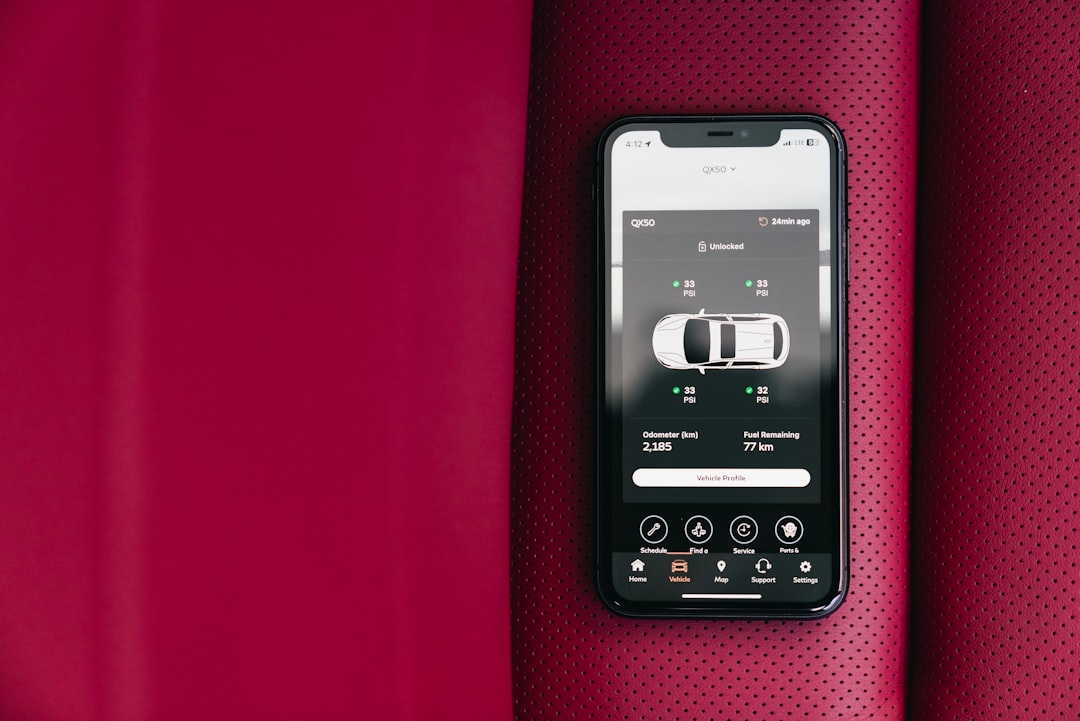
A common technical question is: “What does each fault code that appears in the app mean?”. OBD-II codes follow an international standard.Codes that begin with P refer to the engine and transmission, B refer to the chassis, C to comfort, and U to communication networks. The first digit indicates severity, the second the affected system, and the last three specify the exact problem. Your automotive scanner app should include a complete dictionary of these codes.
Owners also ask: “Can I use an automotive scanner app to repair my car by myself?”. Read the codes, yes, you can do this easily with an app. But making repairs without technical knowledge is risky. Use the app to diagnose, share the results with a qualified mechanic and leave the repairs to the professionals. The app is an information tool, not an action tool.
An important safety question is: “Deleting a fault code causes damage to the vehicle?”. No, deleting codes is completely safe. The error-clearing function only removes information from the onboard computer’s memory.However, if the problem that caused the code has not been resolved, the error will appear again as soon as the conditions that generated it occur.
Users often ask: “How do I know if my vehicle is compatible with automotive scanner apps?”. Most cars manufactured from 1996 have standard OBD-II port and is compatible.Newer vehicles usually have full compatibility. To be sure, look for the diagnostic port under the steering wheel and make sure your app supports your car model and year before purchasing an adapter.
Another recurring question is: “What is the difference between automotive scanner app and professional diagnostic software?”. Apps are simplified versions focused on home users, offering basic reading and monitoring functionality.Professional software offers much deeper diagnostics, component programming, advanced testing, and multi-protocol support. Apps are sufficient for preventive maintenance, but professional software is required for complex repairs.
Many users ask: “Does the app consume a lot of battery from my phone?”. Automotive scanner apps, when used moderately, consume little battery.The Bluetooth adapter also does not consume much power.If you use real-time monitoring continuously for hours, yes, the cell phone battery will consume faster.For occasional use, the impact is minimal.
Finally, owners ask: “Can I rely on app readings to make repair decisions?”. Readings are reliable for identifying problems, but you should always confirm with additional tests or consult a mechanic.The app provides valuable information that reduces the need for paid diagnostics in workshops, but should not be your only source of information for complex problems.
Practical Applications of Automotive Scanner App in Day to Day
When the check engine warning lights up unexpectedly while you are driving, an automotive scanner app solves your problem in seconds.You can check whether it is safe to keep driving or whether you need to take the car immediately to a mechanic. This quick diagnostic capability is particularly valuable when you are on a long or distant trip from home.
Before taking the car to a workshop, use the app to have an initial diagnosis.You can share the fault code with the mechanic, allowing him to prepare with the right parts and tools needed before you arrive. This significantly reduces the repair time and, consequently, lowers the cost of labor.
For those who use shared car or rent vehicles frequently, an automotive scanner app offers a guarantee that the car is in good working order.If you detect any problems before accepting a rental, you can negotiate the price or choose another vehicle. This practice protects you from unexpected costs during the rental period.
Owners of older vehicles or those with a history of mechanical problems benefit greatly from regular monitoring with an automotive scanner app. You can track the progression of minor problems before they become expensive repairs, allowing you to plan maintenance budgets in advance.
For professional drivers like taxi drivers and app drivers, an in-car scanner is essential. You can check vehicle status quickly between races, identifying issues before they affect your ability to work.Many of these professionals use apps with advanced functionality to monitor fuel consumption and engine performance.
Tips to Maximize Use of Your Automotive Scanner App
Take regular readings even when the vehicle is working well. Establish a monthly routine check for normal operating baselines.When you have reference to how the parameters should be under normal conditions, you can identify subtle changes that indicate problems in development well before they become severe.
Keep a record of the readings and codes you find. Many apps let you export PDF reports or save history.This documentation is valuable for tracking recurring problems, sharing with mechanics, and even using as proof of maintenance when selling the vehicle.
Learn to differentiate between critical errors that require immediate action and less serious errors that can be monitored. An emissions system-related code may be less urgent than a brake system failure code.
Combine the information of the app with technical knowledge. If you do not understand what a code means or how to solve it, do not hesitate to consult a mechanic. The app provides valuable information, but does not replace professional experience for complex repairs.
Keep the OBD-II adapter clean and well connected. Moisture or loose connections can cause inaccurate readings or frequent disconnections.If the adapter is plugged in, periodically check that it is well-fitted to the diagnostic port.
Updating the app regularly ensures you have the latest features and compatibility with the latest vehicles. Automotive scanner app developers keep expanding databases and adding support for new models constantly.
Do not rely on the app for preventive maintenance only. Combine the use of the scanner with regular physical checks such as oil change, tire inspection and filter cleaning. The app reads electronic problems, but you still need to do basic manual maintenance.
Security and Privacy when Using Automotive Scanner Apps
Privacy of your data is important when you use an automotive scanner app. Look for apps that offer clear data protection and do not sell information about your vehicle or driving habits to third parties. Read the developer’s privacy policy before installing and giving access permissions to the app.
Some apps include GPS tracking features that may be useful but also put your privacy at risk if not properly protected. If you don’t need this functionality, choose an app that doesn’t include it or disable it in your security settings.
The security of the OBD-II adapter is also important.Unauthenticated or counterfeit adapters can be inserted by third parties to steal data or control your vehicle remotely. Always buy from trusted sellers and check the authenticity of the adapter before using it.
Be careful when sharing diagnostic reports with third parties.If you export a PDF with your vehicle data, this file contains sensitive information about the status of your car. Share only with trusted mechanics and whenever possible, use encrypted communication.
If you leave the OBD-II adapter permanently connected, someone with technical knowledge in your surroundings could theoretically access vehicle data via Bluetooth. Keep Bluetooth pairing secure and use strong passwords if the app offered this additional protection functionality.
Future Trends in Automotive Scanner Apps
Integration with artificial intelligence is transforming the way automotive scanner apps work. AI algorithms can identify patterns in diagnostic data that help predict future problems with greater accuracy than manual interpretation.Next generations of apps will use machine learning to offer personalized maintenance recommendations based on your vehicle-specific usage pattern.
5G connectivity will allow apps to offer real-time remote diagnostics with low latency.You will be able to instantly connect with remote mechanics who can track your vehicle data in real time and offer technical advice while you are monitoring the problem.
Electric vehicles are becoming increasingly common, and automotive scanner apps are expanding their capabilities to diagnose specific problems with batteries, electric motors and charging systems.
Integration with motor assistance systems such as adaptive cruise control and autonomous driving will require automotive scanner apps to work more seamlessly with the vehicle’s core systems.The future sees apps that not only diagnose problems but suggest automatic fixes in scenarios where this is safe.
Augmented reality is starting to appear in more modern automotive scanner apps.You’ll be able to point your phone’s camera at a part of the car while the app shows in real time which sensors and electronics are located at that specific point, making it easier to diagnose more accurately and repair more securely.



